If you’ve spent enough time working with Microsoft Entra Conditional Access, you’ve probably encountered a tenant with dozens of policies, complicated naming conventions, and exclusions that seem to appear everywhere.
Creating Conditional Access policies isn’t particularly difficult. Keeping them organized as the environment grows? That’s a different story.
Microsoft has introduced Conditional Access Policy Plans, currently in Preview, and I think this is an interesting improvement to how we manage access policies.
It’s not about introducing another authentication method or a new security control. It’s about making existing controls easier to organize, understand, and maintain.
What’s changing?
Traditionally, Conditional Access policies have been managed individually.
Let’s say I want to protect a particular group of employees with the following requirements:
- Require phishing-resistant MFA.
- Require compliant devices.
- Block access from certain locations.
Until now, I would typically create separate policies, each with its own assignments, exclusions, conditions, and controls.
This works, but it also introduces repetition.
With Policy Plans, we can organize related requirements under a common objective and define their shared settings once.
A plan contains one or more rules, and each rule inherits the shared conditions configured at the plan level.
For example:
Policy Plan: Corporate Employee Access
Shared scope:
- Include the relevant employee groups.
- Exclude emergency access accounts.
- Apply to selected corporate resources.
Individual rules:
- Rule 1: Require phishing-resistant MFA.
- Rule 2: Require compliant devices.
- Rule 3: Block access based on selected risk conditions.
Instead of maintaining the same assignments across several independent policies, we manage the common configuration centrally.
And that’s where things start getting interesting.
Creating a Policy Plan
The new feature is available in the Microsoft Entra admin center under:
Entra ID → Conditional Access → Policy plans (Preview)
When creating a plan, we can specify its name, description, owners, and tags.
We can also define three categories of shared configuration:
Shared identities: Users, groups, agents, and workload identities that the plan applies to.
Shared resources: Applications, user actions, and authentication contexts.
Shared conditions: Conditions such as network locations, device platforms, and risk levels.
These settings are inherited by the rules we create within the plan.
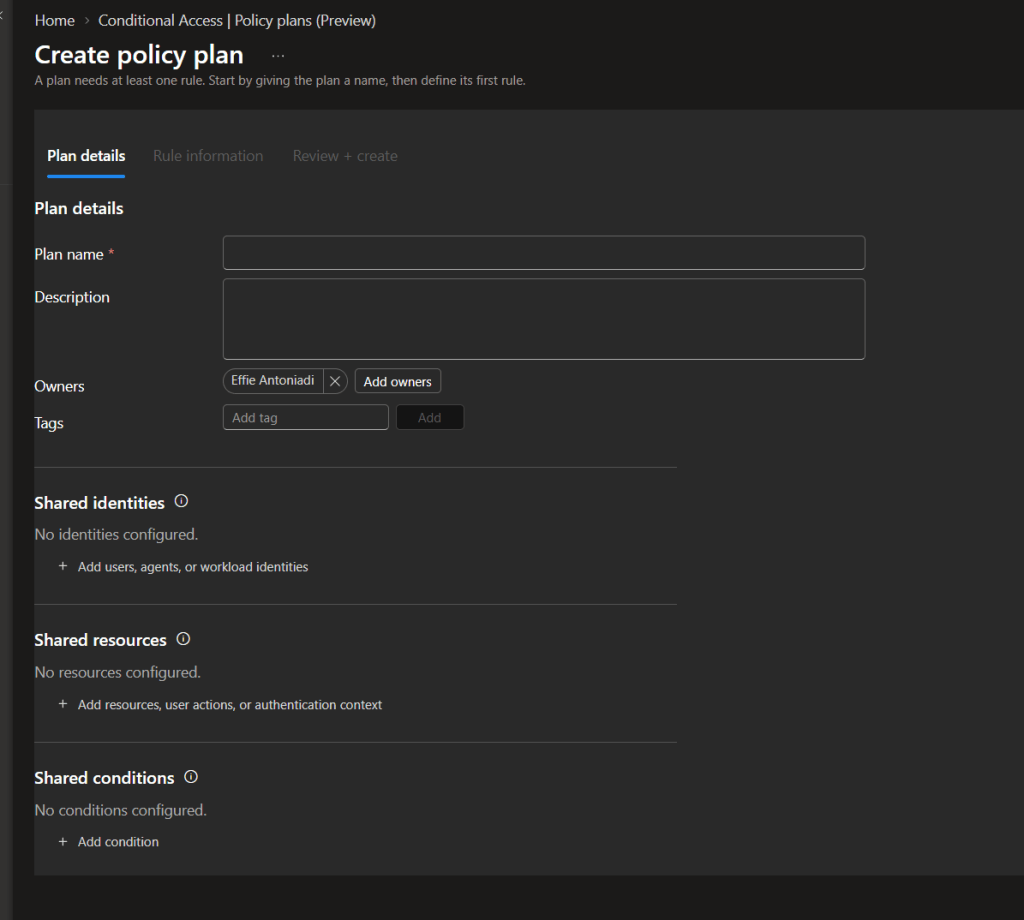
One detail I particularly like is the addition of owners and tags. Conditional Access has always needed better organization, especially in environments where several administrators are responsible for different security requirements.
Ownership doesn’t replace administrative permissions, but it does make it easier to document who’s responsible for a particular set of access controls.
There’s also an important design consideration: only configure something as a shared condition if it’s genuinely intended to apply to every rule.
For example, excluding an emergency access account at the plan level means that exclusion applies across the entire plan.
Starting from templates
We don’t necessarily have to start from scratch.
Microsoft provides built-in templates covering common security scenarios, including:
- Requiring MFA for administrators.
- Blocking legacy authentication.
- Securing security information registration.
- Protecting Azure management access.
- Requiring compliant devices.
There are also template categories for Zero Trust, remote work, administrators, emerging threats, and AI agents.
What’s interesting is that we can select multiple templates and combine their rules into a single Policy Plan.
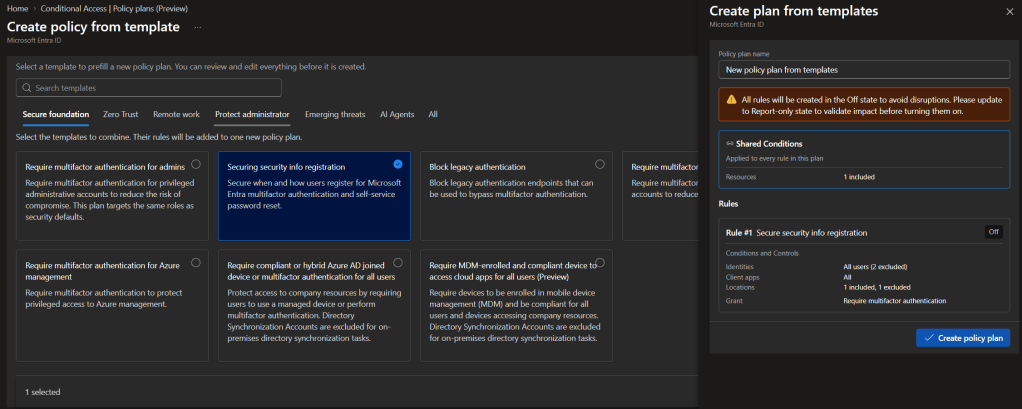
This could be useful when building a new environment or standardizing access requirements across multiple tenants.
However, I wouldn’t recommend deploying every available template simply because it’s there.
Each rule still needs to be reviewed against the organization’s authentication methods, device management strategy, emergency access requirements, and existing policies.
Another important detail: rules created from templates start in the Off state. They should be reviewed and tested in Report-only before enabling enforcement.
What about existing Conditional Access policies?
This is probably the part I find most useful.
Not every organization is starting with a clean tenant. Most environments already have a collection of Conditional Access policies that have evolved over several years.
Microsoft has introduced a migration experience that allows us to select existing policies and merge them into a Policy Plan.
The migration process identifies common settings and proposes them as shared conditions. The selected policies become individual rules within the new plan.
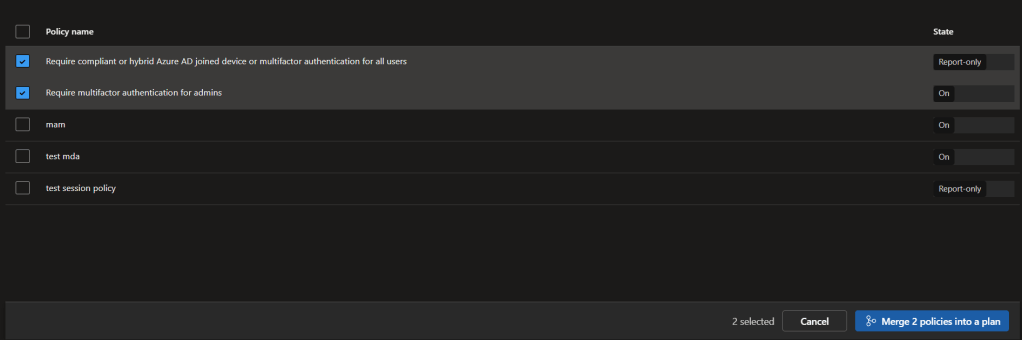
In my example, I selected two existing policies:
- Require compliant or hybrid Azure AD joined device or multifactor authentication for all users.
- Require multifactor authentication for admins.
The interface offers the option to merge both into a single plan.
Of course, these two policies have different purposes, so I would first review whether grouping them actually makes sense.
Just because policies can be combined doesn’t necessarily mean they should be.
The migration process also doesn’t automatically remove the original policies. They remain in place and retain their existing states, allowing us to review the new configuration before making any changes.
That is particularly important because existing policies and enabled Policy Plan rules can both be evaluated during sign-in. We need to avoid unintentionally enforcing overlapping requirements during migration.
Does this change how Conditional Access works?
Not fundamentally.
Conditional Access still evaluates applicable requirements and determines whether access should be granted or blocked.
A Policy Plan is not a way to bypass or override existing policies.
Each applicable rule is evaluated independently, and the existing Conditional Access policies continue to apply.
The main difference is how we define, organize, and maintain those requirements.
And although the new approach reduces duplication, it doesn’t eliminate the need for careful policy design.
A shared condition configured incorrectly could now affect several rules instead of just one policy.
My thoughts
I like this direction.
Conditional Access has become significantly more capable over the years, but the management experience hasn’t always kept pace with that complexity.
Naming conventions have helped, but they aren’t a substitute for having an actual structure.
Policy Plans introduce a more organized approach, particularly for environments with many policies, multiple administrators, or clearly separated security objectives.
I’d still approach the Preview cautiously. I’d start with a small set of related policies, validate the resulting rules in Report-only, and review sign-in logs before moving anything into production.
For now, I see this primarily as an improvement in manageability rather than a new security capability.
And considering how complicated Conditional Access configurations can become, that’s already a welcome change.
Further reading


Leave a Reply